 Active Intercom
Connect a remote commentator to vMix
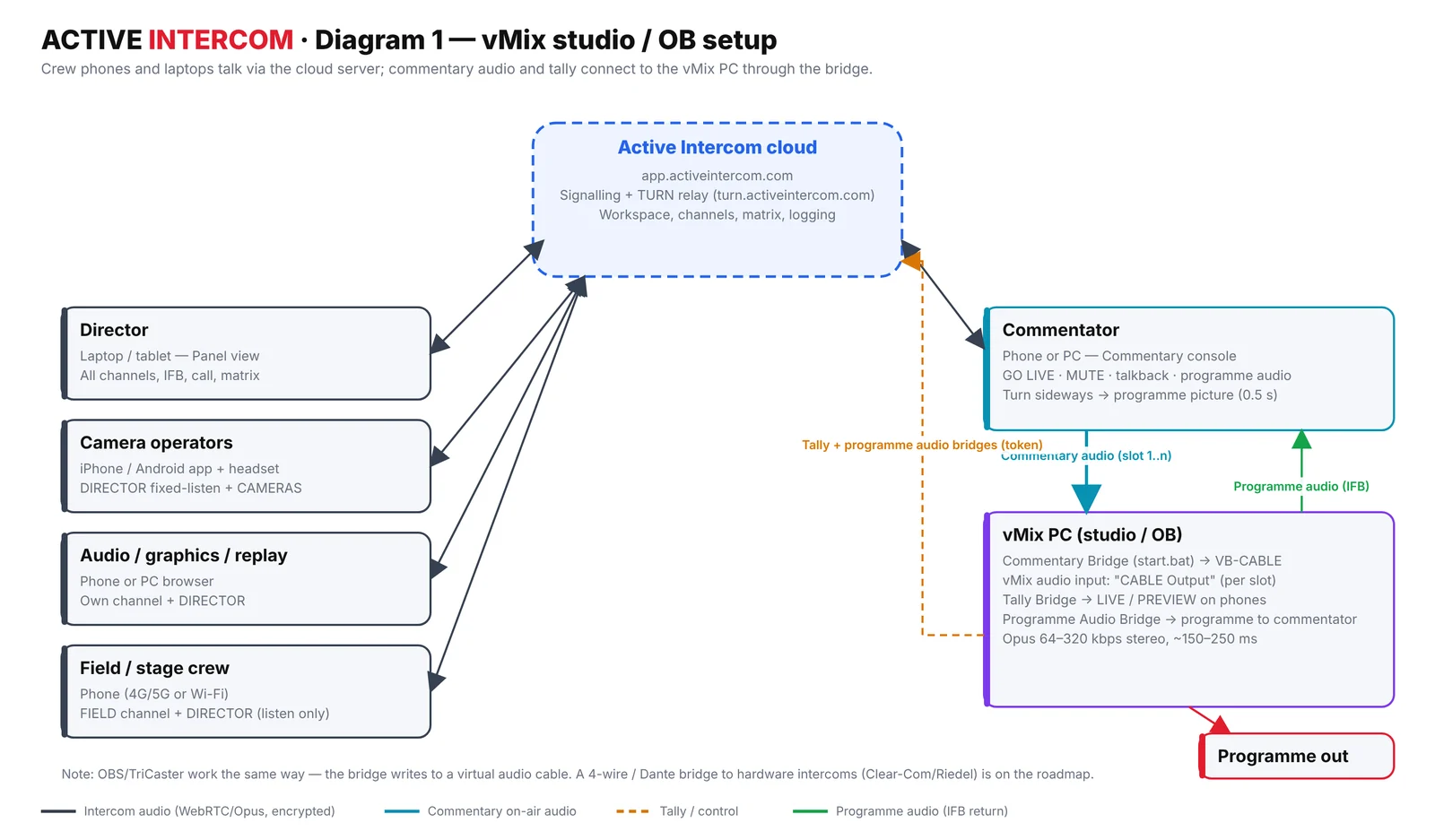
The commentator talks into the Active Intercom app; their voice arrives in vMix as an audio input, in broadcast quality (Opus, up to 320 kbps stereo).
- The vMix PC (Windows) with internet access
- Node.js LTS and VB-CABLE (free) on that PC
- A commentator account (Admin › Users › Commentator)
- Chrome or Edge on the vMix PC
Make the user a commentator
In Active Intercom open Admin › Users, edit the commentator's account, tick Commentator, choose the on-air role (commentator / analyst) and a slot number. With one commentator use slot 1.
Prepare the vMix PC
Install Node.js LTS (nodejs.org) and VB-CABLE (vb-audio.com/Cable — run the installer as Administrator and reboot). Set Windows power options so the PC never sleeps.
Install the Commentary Bridge
Download the bridge from get.activeintercom.com/bridge and unzip it to C:\active-intercom\commentary-bridge\. Open Admin › Tally in Active Intercom, copy the Tally Token and paste it into config.json as "token".
Start the receiver
Double-click start.bat. The first run installs what it needs and opens http://localhost:8766. Set Output device to CABLE Input (VB-Audio Virtual Cable) and press Start receiver. The status must read Connected — receiver registered.
Add the input in vMix
In vMix: Add Input › Audio › CABLE Output (VB-Audio Virtual Cable). Route it to Master (and any bus you use). Turn on vMix Audio Delay only if you need to line the voice up with delayed video.
Go live
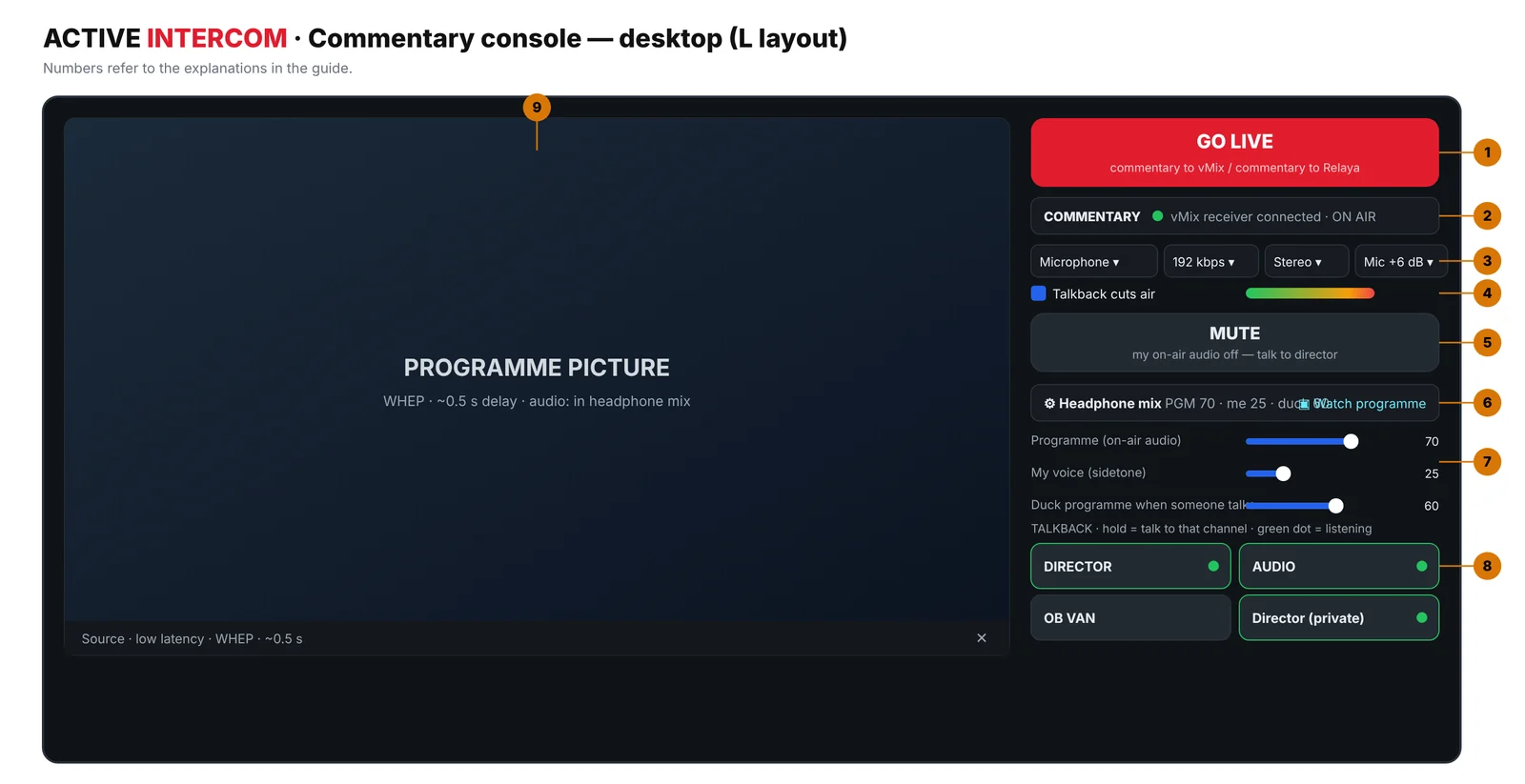
The commentator signs in, chooses the microphone and quality (192 kbps recommended) and presses GO LIVE — the button turns red, ON AIR. On the bridge page their name appears with a level meter and the incoming kbps; the CABLE Output input moves in vMix.
Test talkback
Ask the commentator to hold a talkback key (for example DIRECTOR). With Talkback cuts air ticked (default), their on-air audio is muted while they talk to the director — nothing leaks into the programme.
Troubleshooting & tips
- No audio in vMix
- Is the start.bat window open and CABLE Input selected? Is the CABLE Output input open in vMix with the fader up? Is the commentator on air and not muted?
- "No vMix receiver" on the console
- The bridge is not running or the token is wrong — restart start.bat and check config.json.
- Choosing the output device does nothing
- Use Chrome or Edge on the vMix PC; Firefox cannot select an output device.
- Lip sync
- Expect about 150–300 ms end to end; use vMix Audio Delay on the camera inputs if needed.
Share this guide
Related solutions
More guides
Start 7-day free trial
No card required · set up in 5 minutes
Start free